Kubernetes Simulator
Missions
Static websitebeginner, 7 missions
Put nginx on the cluster, give it an address, scale it for launch day and ship v2 — then survive the 3am page.
REST APIintermediate, 7 missions
Config and secrets, a crash loop, health checks, memory limits, a launch-day traffic spike and a rotated password — for a service people depend on.
Batch pipelineintermediate, 6 missions
Jobs that run to the end and stop: retries, parallel work, a nightly CronJob, runs that pile up, and a 2am failure to backfill.
Multiplayer game serveradvanced, 7 missions
Servers with names that stay put, saves that survive a restart, a one-server canary, draining a node without emptying the arena, a server stranded by its own disk — and volumes kept past their claims and bound back to them.
Microservices shopintermediate, 7 missions
A frontend and two APIs that have to find each other: Services and cluster DNS, the port a Service forwards to, one Ingress in front of it all, NetworkPolicies that decide who may talk to whom and what may leave, a NodePort, and an ExternalName for a database outside the cluster.
Multi-team platformadvanced, 5 missions
One cluster, two teams: namespaces to keep them apart, RBAC for a CI robot and an on-call engineer, and quotas so neither can starve the other.
Node fleetadvanced, 8 missions
Which pod runs where: labels and selectors for the right hardware, taints to reserve a node, requests that must fit, a node emptied for a kernel patch — then replicas kept apart, spread evenly, steered by node affinity, and priority deciding who gets evicted.
Payments serviceadvanced, 4 missions
A JVM service that moves money: run its migration before the release, give a slow starter time to boot, look inside a pod with no shell, and pull back a bad release mid-rollout.
Projectsadvanced, 3 missions
Whole launches from an empty cluster, written as tickets: a web store with an API and launch-day traffic, a multiplayer game with stateful servers, and an AI model on GPUs. No starter files, no commands in the hints.
About this simulator
Your own terminal on a cluster that behaves like the real thing. Type real kubectl commands, watch pods schedule, roll out and fail — then fix them.
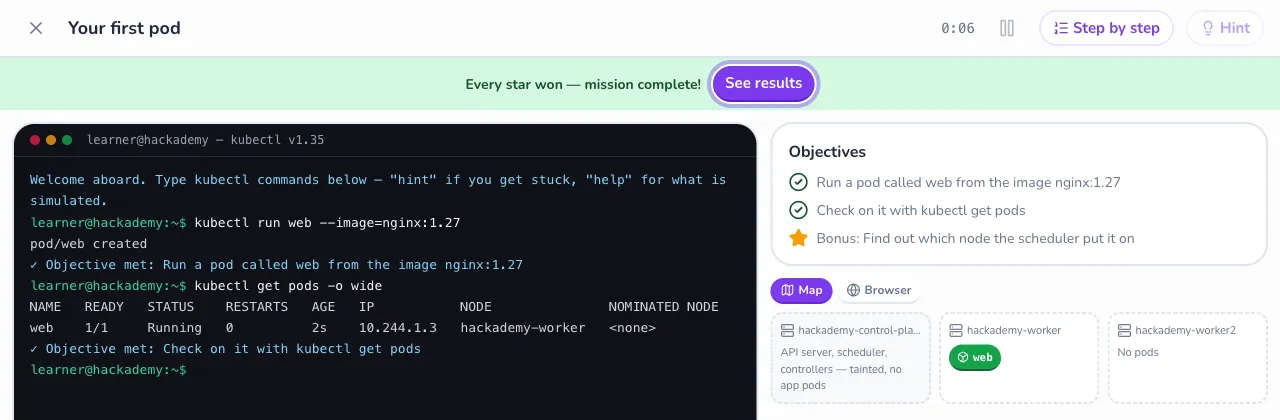
Real commands, real output
Pinned to Kubernetes v1.35.0. What kubectl prints here is what it prints on a real cluster.
Any way that works
A mission checks the cluster, not your keystrokes: imperative or YAML, both pass.
Nothing to install
It all runs in your browser. Break whatever you like.
Kubernetes Simulator: 54 missions across 9 apps, from beginner to advanced, plus a sandbox to try anything. Free in your browser, with nothing to install.
Questions
- Is the Kubernetes Simulator free?
Yes. Hackademy takes no payments, so every mission is free. You can play 2 missions per simulator without an account; a free account keeps your stars and XP and opens the rest.
- Is it a real system?
No: it is a simulation that runs in your browser, so there is nothing to install and nothing you can break for real. Pinned to Kubernetes v1.35.0. What kubectl prints here is what it prints on a real cluster. A command it doesn't simulate says so rather than inventing output.
- How does a mission check my work?
It checks the state of the system, not your keystrokes, so any fix that works passes. You earn up to three stars: one for passing, one for not revealing the answer hint, and one for the mission's bonus objective.
- What do the missions cover?
54 missions across 9 apps: Static website (beginner), REST API (intermediate), Batch pipeline (intermediate), Multiplayer game server (advanced), Microservices shop (intermediate), Multi-team platform (advanced), Node fleet (advanced), Payments service (advanced), Projects (advanced). Missions in an app unlock in order; projects are open from the start.
- Can I practise without a mission?
Yes. The sandbox opens after your first mission: every simulated command and no objectives, so you can try anything.